

Gameplay Video
INTRO
This project is based on popular FPS games such as Doom with an emphasis on clean and readable UI due to fast paced Action.
SOFTWARES USED
Unreal Engine - Widgets and Blueprints
(Based off Unreal Engine First Person template)
Photoshop - Cleanup of UI
THEMES & INFLUENCES
-
Primary Inspiration comes from fast paced first-person games such as Dishonoured, Doom
-
Also inspired by clean and minimalistic approach of Sniper Elite Series

DESIGN ANALYSIS

Information (Tutorial) Readability
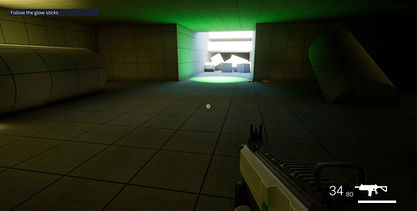
The objectives are located on the top-left of the screen where the action does not take place allowing players to reference the progress of objectives whenever necessary without taking away from the action.
The tutorials are located middle-left of the screen beside the crosshairs making sure that the players eye level is not changed while performing an action or while in middle of combat.
The BOLD Title header behind a transparent background ensures the player does not struggle to read the title and decide to follow with the tutorial content or go back to gameplay and ignore the tutorial.
The tutorial text is darker contrasting the white background to make the text easier and quicker to read.
The timer bar below the tutorial indicated the time remaining for the tutorial box to disappear to help player decide whether to wait or continue with the gameplay since most of the players decide to wait out until the tutorials are completely displayed before moving on with their gameplay

Ammo and Weapon Information
Since the environment is planned to be more colourful (NOT THE CURRENT GREYBOXES), I went with more minimalistic approach my making the colours white to contrast with the darker level themes.
Ammo Count is deliberately made bigger to make sure player eyes are always redirected towards the number even in heavy combat situations.
The reserve ammo is beside the current ammo with a smaller size (half of the current ammo count) so the reserve ammo count is always registered when player looks at the ammo.
The current weapon is screenshotted and filled with white paint and is changed based on the currently equipped weapon to make sure player has clear information just for HUD rather than search in the scene.
The health counter is placed in the bottom right corner beside the ammo counter so that the current health is always registered whenever player looks for ammo information or vice versa.
Placing Ammo and Health, Two important and dynamic mechanics together is to avoid player frustrations when they need to look health in one corner and ammo in another corner.
COMPARISIONS
Here are some comparison shots of Unreal Engine First Person Template UI vs My UI

The first was made is for the health bar moving away from orange coloured rounded box to white coloured sharp edged box to make it more impactful moving away from colourful bar to a serious monotonous colour.
While the usage of orange colour with rounded edges is perfectly fine by a fun/un-serious gameplay, White monotone colour with sharper edges makes it more serious and eye catching in a high intensity gameplay.


Another major change is moving away from blocky ammo counter in the bottom left without any numerical indicators to numerical UI counter. This will help the players to quickly assess their situations in intense combat encounters and take decisions on the go rather than wasting time to calculate the blocks (bullets) left before taking action.
Once the ammo counter is done, I've added reserve ammo counter (addition to my work which is not present in the template) and placed them near health counter.
This decision is made to help the players to look at one corner and get information rather than looking top left for health and bottom left for ammo count.

Another unique addition that I tried to add is enemy floating health bars. These are added as widget components to AI NPCs and are rendered on SCREEN rather than WORLD. This is to ensure they do not clutter up together when AIs line up parallel to player and draw on screen based on AIs position.
This also allows them to be seen in LOWER DIFFICULTIES when AIs are behind an object and enable them when are in player proximity without letting players know to make them feel more powerful and intuitive and can be disabled on HIGHER DIFFICULTIES to make fights more intense and build up to AI ambushes.
UI Hierarchy


OUTCOMES
-
Created a playable demo using Unreal Engine.
-
Presented the gameplay information with clean and readable UI.